How I Built hogiboes.com
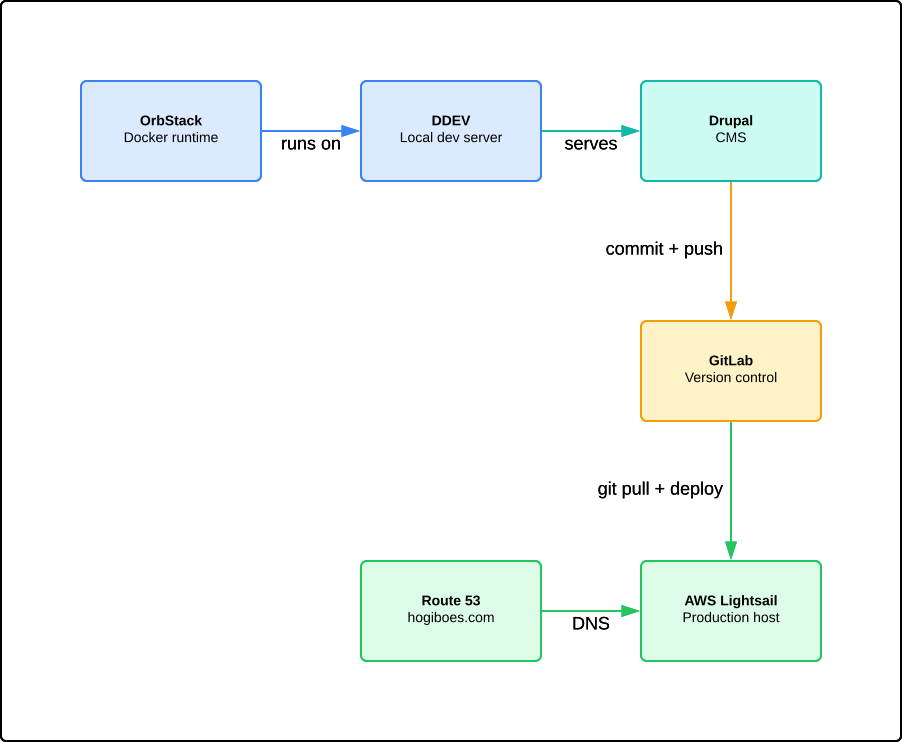
Here is every tool used from my local machine to the live site you are reading now.
OrbStack: The Engine Under the Hood
Every modern web project needs containers. On a Mac, Docker Desktop is the obvious choice, but it is slow and resource-hungry on Apple Silicon. OrbStack replaces it entirely. It runs Docker containers and Linux machines with a fraction of the memory and near-instant startup.
Download it at orbstack.dev. Install the .dmg, drag it to Applications, and you are running containers in under a minute.
I use OrbStack because it stays out of the way. No bloated dashboard, no performance drag. It runs in the background and lets the tools above it do their work.
DDEV: Local Development Made Simple
DDEV is the tool that turns my Mac into a web server. It wraps Docker containers into a simple command-line interface purpose-built for CMS development. Instead of configuring Apache, PHP, MySQL, and SSL certificates by hand, I type one command and everything spins up.
Here are the commands I use every day:
ddev start launches the project. It pulls the right PHP version, starts the database, configures the web server, and gives me a working URL in seconds.
ddev launch opens the site in my browser. No need to remember ports or local URLs.
ddev describe shows everything about the running project: the PHP version, the database credentials, the URLs, the mail setup. When something breaks, this is the first place I look.
ddev drush runs Drupal commands inside the container. Clear cache, export configuration, run database updates.
ddev composer manages PHP packages. No version conflicts between projects, no global installs cluttering the system.
The best part of DDEV is isolation. Every project gets its own container with its own PHP, its own database, its own domain. Nothing bleeds between projects.
Download DDEV at ddev.com. On a Mac with Homebrew: brew install ddev/ddev/ddev.
Drupal: The Content Management System
Drupal is the CMS behind hogiboes.com. It handles content types, taxonomy, user permissions, image processing, URL routing, and theming. I chose Drupal because it scales from a personal blog to an enterprise platform without switching tools.
The site runs a custom theme on top of Tixu and Drupal's Claro admin theme. The photo gallery, the blog filters, the archive heatmap: all built on Drupal's Views system with custom modules where needed.
GitLab: Version Control
Every line of code goes through GitLab. I commit changes locally, push to a private repository, and pull from the server to deploy. Nothing reaches the live site without passing through version control first.
GitLab gives me a full history of every change. If something breaks, I trace back to the exact commit. If I need to undo a mistake, I roll back. The repository is the single source of truth.
AWS: Hosting and Domain
The live site runs on AWS Lightsail, Amazon's simplified hosting service. A single instance with 1 GB of RAM serves the entire site. Lightsail gives me a fixed monthly cost with no surprise bills.
AWS Route 53 handles the domain name. I registered hogiboes.com through Route 53 and pointed its DNS records to the Lightsail instance. SSL runs through Let's Encrypt, so every connection is encrypted.
The Workflow
The process from idea to live site:
1. Edit locally. I write code on my Mac with DDEV running the site.
2. Test in DDEV. I see changes in real time at hogiboes.ddev.site.
3. Commit to GitLab. Once it works, I push the changes.
4. Deploy to AWS. I SSH into the server, pull the latest code, and rebuild the cache.
The whole cycle takes minutes. No build pipelines, no staging servers, no waiting. Just code, test, push, deploy.
Why This Stack
I chose these tools because they stay out of the way. OrbStack is invisible. DDEV handles the infrastructure. Drupal manages the content. GitLab tracks the code. AWS serves the site. Each tool does one thing and does it well.
For anyone building a personal site or a small project, you do not need a complex setup. You need tools that work reliably and let you focus on the thing you are building. This stack does that. For specific details check out this site: https://drupalize.me/tutorial/install-drupal-locally-ddev
Add new comment